A source is where AI gets its material. Add the URL of your news or blog page and new articles are fetched automatically.
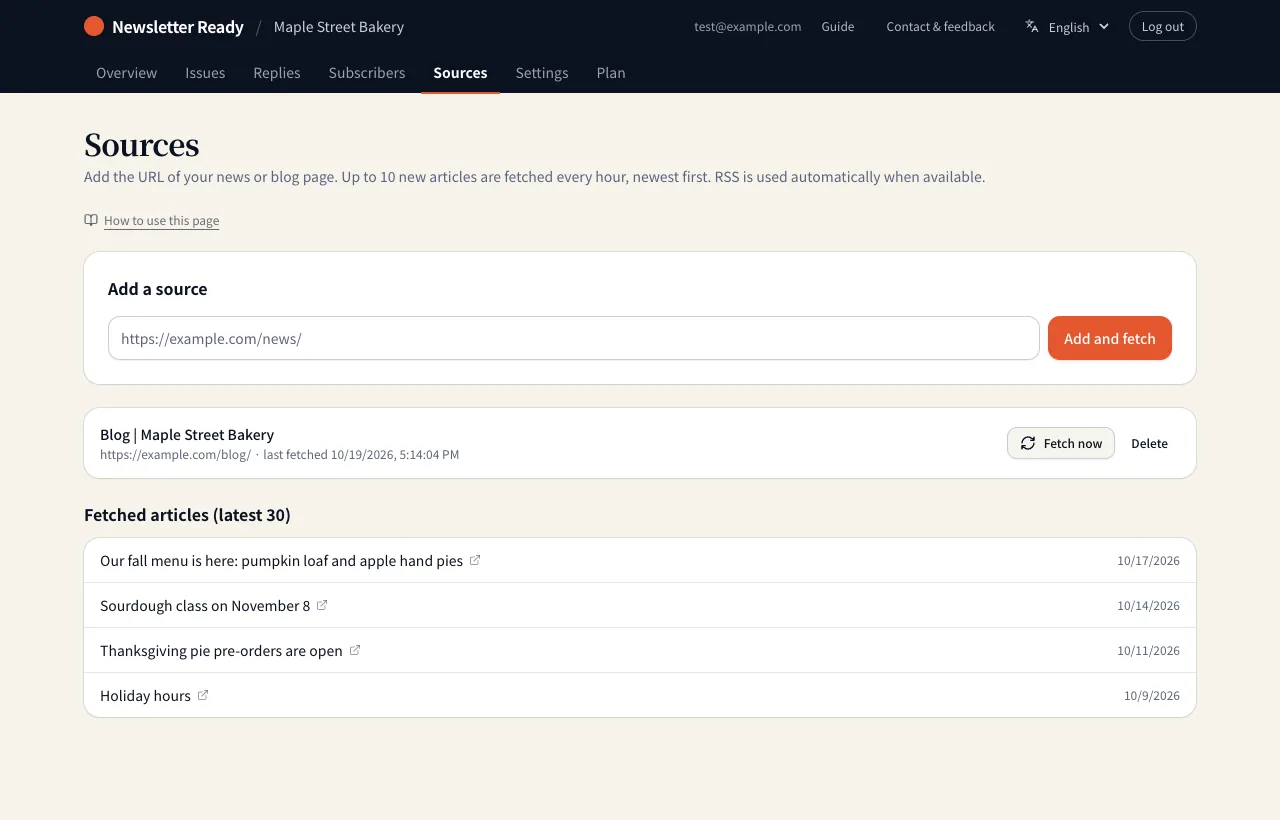
How to add one
- On the Sources tab, enter a URL under "Add a source".
- Press "Add and fetch". The articles are read right away.
- If titles and dates appear under "Fetched articles", it worked.
After that, up to 10 new articles are fetched every hour. To fetch right now, press "Fetch now".
Which URL to use
| Good choices | Example |
|---|---|
| A news or announcements listing page | https://example.com/news/ |
| A blog listing page | https://example.com/blog/ |
| A case studies or products listing page | https://example.com/work/ |
| An RSS feed (used automatically when found) | https://example.com/feed/ |
A listing page with the newest articles first works better than your home page alone. You can add several sources.
When fetching goes wrong
- You see an error: check the URL, and make sure the page does not require a login.
- Unrelated pages come in: use a narrower listing URL, such as /news/ or /blog/.
- Too few articles: add another listing page (blog, case studies and so on).