Newsletter Ready drafts your newsletter from the news and blog posts already on your website. You read the draft and press approve. Sender disclosures, the unsubscribe link and bounce handling are added for you.
The whole flow
| Step | What you do | Chapter |
|---|---|---|
| 1. Sign up | Create an account and an organization (your business) | Sign up and create an organization |
| 2. Settings | Enter your sender name, reply-to address and the disclosures the law requires | First settings |
| 3. Material | Add the URL of your news or blog page | Add your website as a source |
| 4. Readers | Share your subscribe form, or add contacts you already have | Collect subscribers |
| 5. Send | Check the AI draft and approve it | Create and send an issue |
| 6. Review | See opens, clicks and unsubscribes | After sending |
| 7. Replies | AI drafts answers to reader replies | AI reply assistant |
Finding your way around
After you log in, these tabs run along the top.
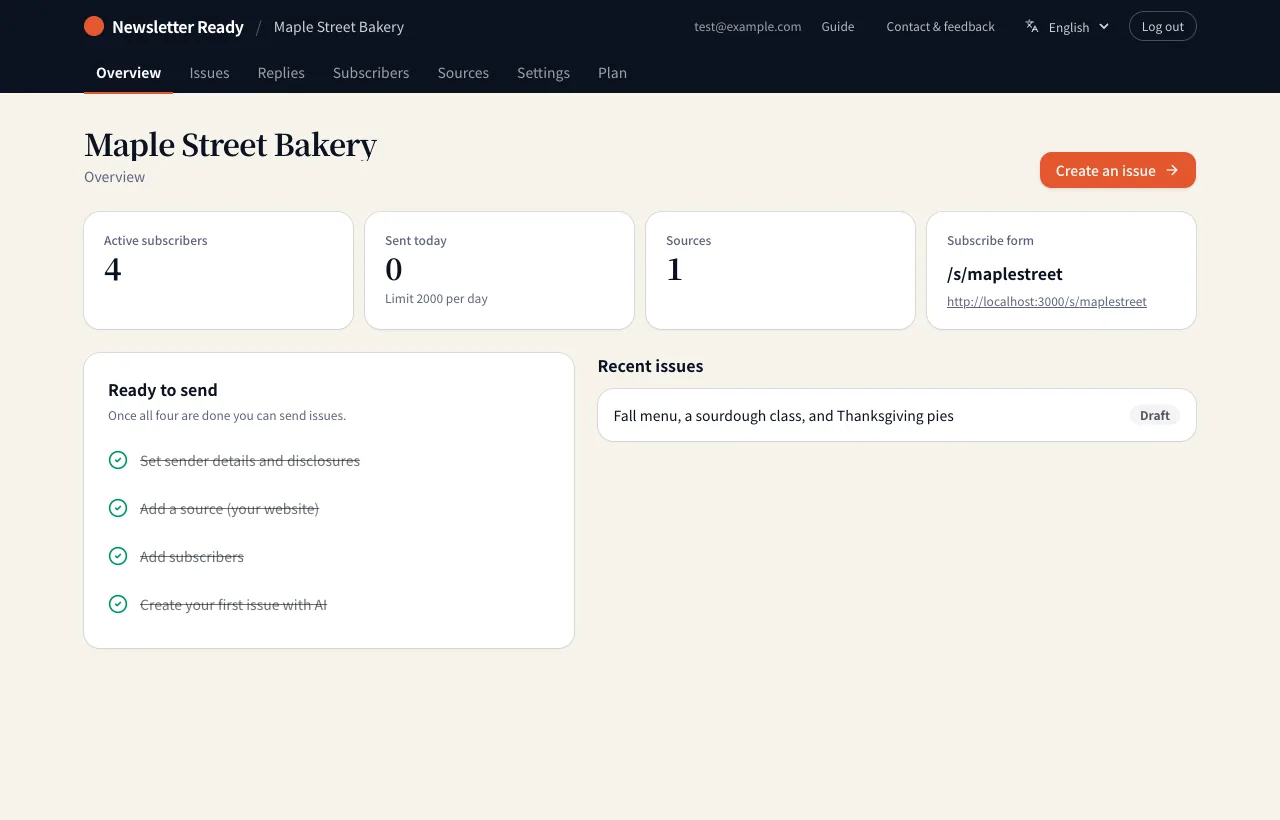
| Tab | What it holds |
|---|---|
| Overview | Active subscribers, emails sent today, your subscribe form URL and the four "Ready to send" steps |
| Issues | Draft an issue with AI, review and approve drafts, past issues |
| Replies | Replies from readers and the answers AI drafted |
| Subscribers | Add, list and unsubscribe contacts |
| Sources | The website pages AI uses as material |
| Settings | Sender details, disclosures, language and region, the AI reply assistant |
| Plan | Your current plan and limits |
Once all four "Ready to send" steps on the Overview tab are checked, you can send.
Plans and limits
The Free plan covers up to 300 subscribers and 4 issues a month. AI can draft up to 10 times a day. The AI reply assistant is currently available on every plan.